FireOps1 gives fire departments a real-time view of incidents, apparatus, responders, attendance, and reporting — from dispatch through the end of the call.
Works alongside your existing dispatch and alerting systems.
Fire department software for everything that happens after the tones drop.
FireOps1 is the in-station operating picture for volunteer, combination, and career departments: who is responding and how far out, what apparatus is rolling, what came over the radio, who was on the call, and what has to be reported. Built by firefighters, priced flat for the whole department, and free to start.
Respond. Record. Ready.
Three jobs every firehouse has to do — handled in one system instead of a whiteboard, a clipboard, and a spreadsheet.
Respond
Know who's coming and what apparatus is rolling.
Live incident board — on the wall, in the rig, or on a phone
Responders with live ETAs — who is coming and how far out
Radio traffic logged against the call as it happens
Apparatus status, en-route and arrival times
Run order — including run order exceptions
Mutual aid given and received
Member availability and active status
Record
Capture what happened without rebuilding it afterward.
Attendance at calls, drills, meetings, and events
Full incident history, with previous calls at the location
LOSAP service records fed by real check-ins
NERIS federal reporting through the official API
Training review and event RSVPs
Attendance, LOSAP, and kiosk check-in come with Station Admin; NERIS submission with Captain.
Ready
Keep the station and apparatus ready for the next call.
Guided apparatus and equipment checks
Firehouse and rig inventory by compartment
Work order tickets and out-of-service tracking
SOPs, policies, and member acknowledgment sign-offs
Readiness runs on the VERIFI and PROBIE add-ons — $33/month each, or on their own without FireOps1.
From dispatch to completed call.
FireOps1 follows the incident through the station instead of making members reconstruct everything afterward.
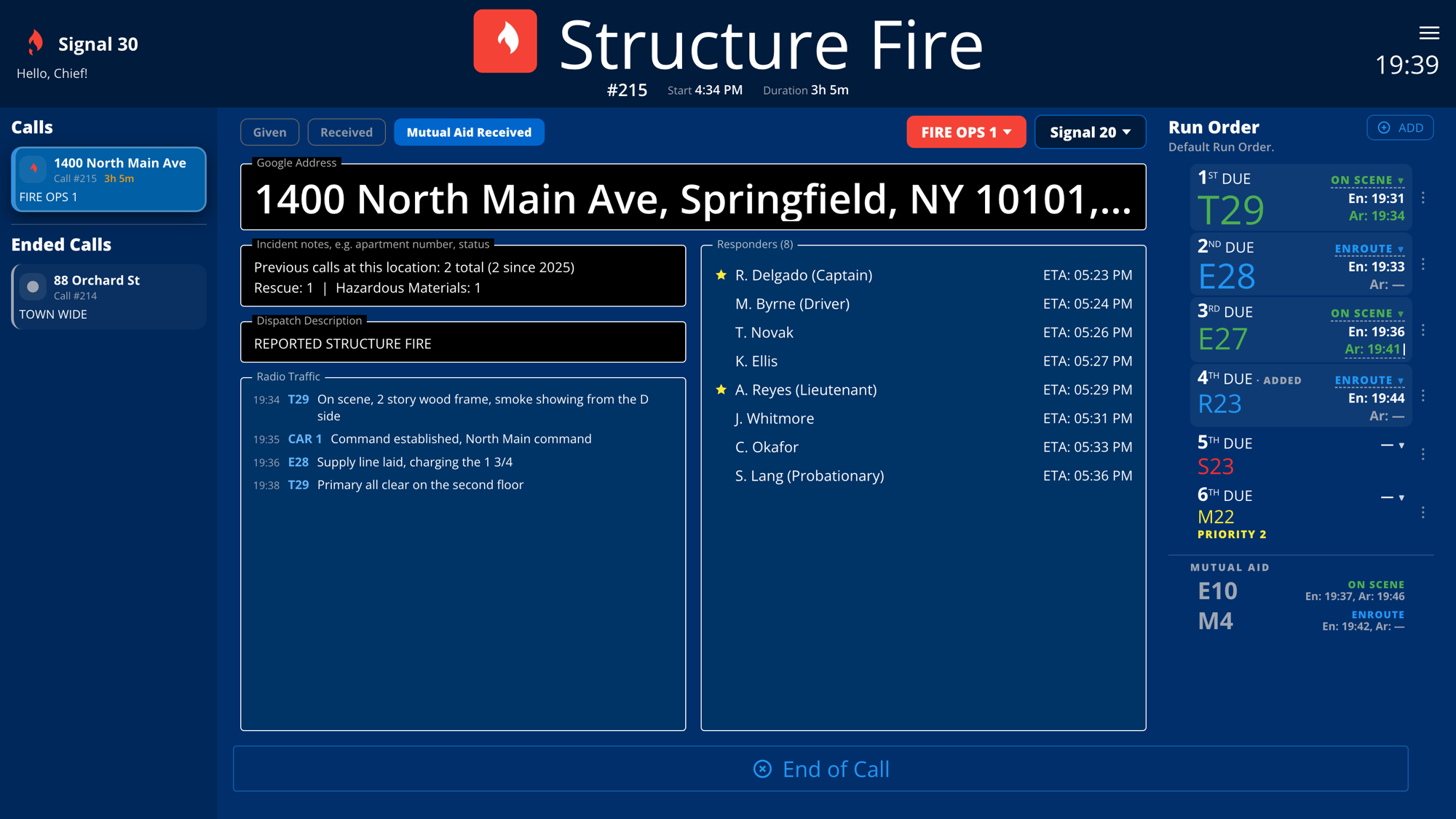
A real call running end to end in FireOps1. Acme Fire District is a demonstration department — every name, address and time on screen belongs to it, not to a customer.
1
Dispatch goes out
Your CAD, pagers, radios, and station alerting do exactly what they do today. FireOps1 changes nothing about how members get toned out.
2
The call opens in FireOps1
An officer or dispatcher starts the call in a couple of taps. Departments running the Dispatcher module get it automatically — location, call type, notes, and mutual aid land as the call starts.
3
Members get the call on their phone
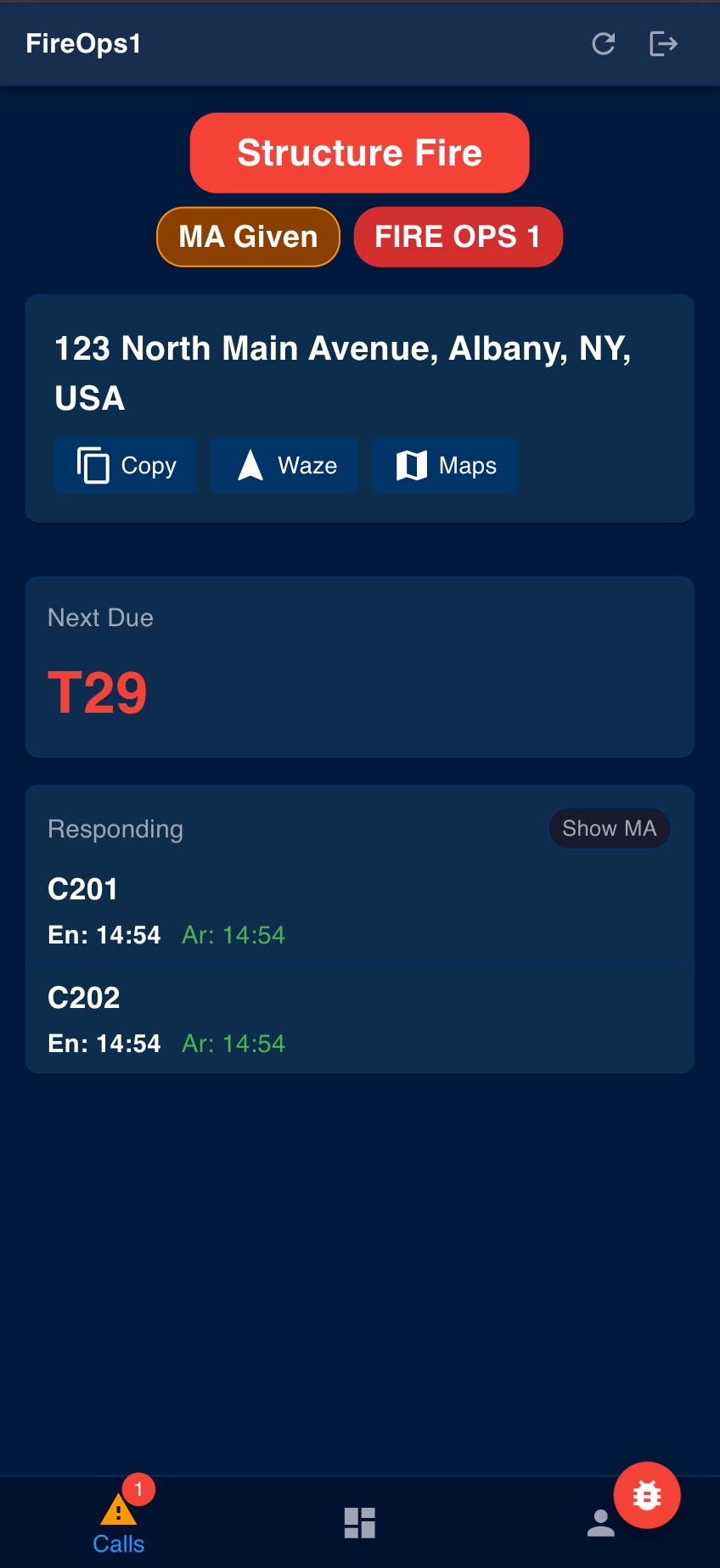
The call type, the address with one-tap Waze or Maps directions, what is next due, and which units are already responding. When a member marks responding, their ETA goes up on the board with them.
4
Run order and apparatus are on screen
First due, second due, and any run order exception are visible to everyone — in the station, in the rig, and on a phone.
5
Officers see who's responding, and how far out
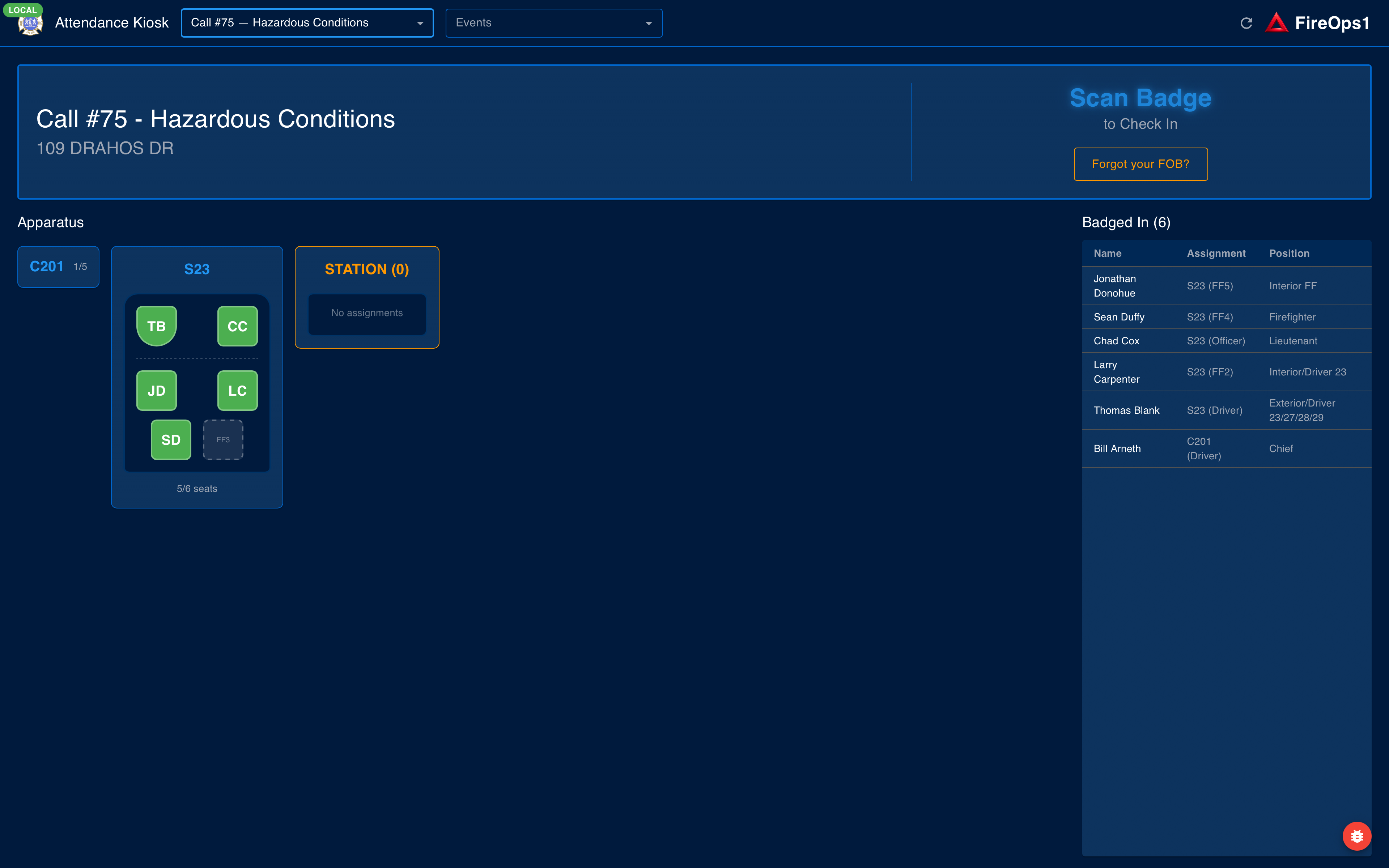
Responding apparatus with en-route and arrival times, the responder list with each member's ETA, and riding assignments as members badge in at the station kiosk.
6
Radio traffic lands on the call
Size-up, command, and the primary all clear are logged against the incident with the unit and the time. Everyone in the station reads the same picture, and it stays with the call afterward.
7
End of call
One button closes it out. Times, units, responders, and attendance are already on the record — nobody reconstructs the call from memory a week later.
8
Reporting starts from what you already entered
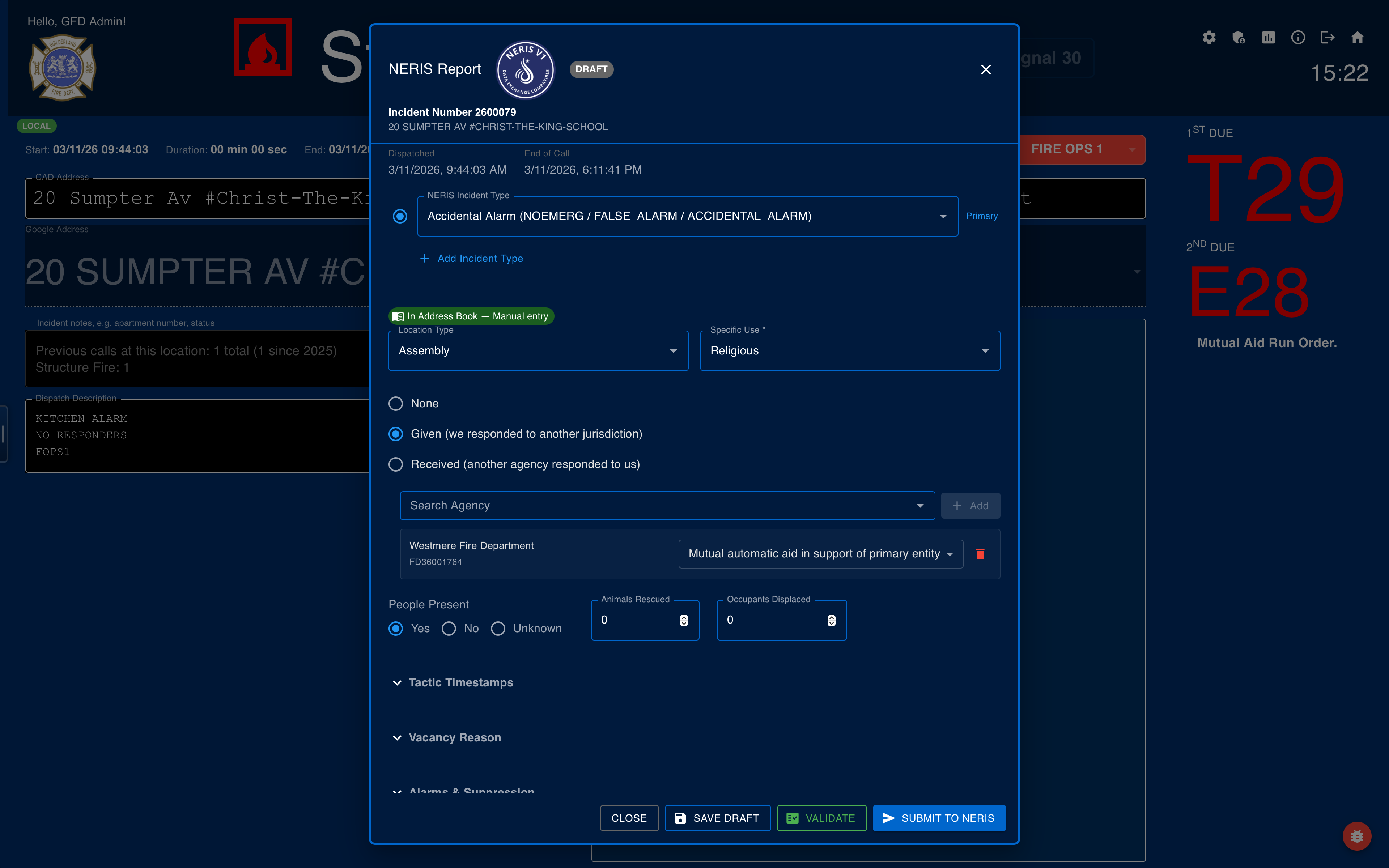
The call you worked is the incident record. On Captain and Chief tiers, finish the remaining NERIS fields, validate, and submit to the federal API from the same screen.
One call in FireOps1 — the dispatch address and notes, previous calls at that location, radio traffic as it comes in, and the responder list with each member's ETA. Down the right, every rig in the run order carries what it is doing and when it went en route and arrived; a rig that turns out without a slot is added in place, and mutual aid is listed on its own. Other active calls stay one click away in the left rail.
Members badge in at the station kiosk. Riding assignments and attendance are recorded as it happens. Station kiosk details →When the call ends, the report is already most of the way written. Review, validate, submit to NERIS. Full NERIS reporting details →
The paperwork that never quite gets done.
Every department has the same four piles. Here's what FireOps1 does with them.
Today
Paper attendance sheets get lost — or filled in from memory a week later.
With FireOps1: Members badge in with the FOB they already carry, at the call or the drill. Attendance is recorded the moment it happens and feeds LOSAP points and active-member status.
Today
Truck checks get pencil-whipped, and failed items end up on a whiteboard.
With FireOps1: VERIFI walks the same check on a tablet, time-stamps every item, and turns a failure into a work order that stays open until somebody closes it.
Today
Policy acknowledgment is a mess of binders, email receipts, and sign-in sheets.
With FireOps1: PROBIE assigns the document, tracks acknowledgment member by member, and keeps a record of who signed which version, and when.
Today
Year-end LOSAP reconciliation turns into a hunt for missing paperwork.
With FireOps1: Points come from attendance already captured all year, and members watch their own service hours in the app instead of waiting on the annual letter.
Keep the systems your department already relies on.
FireOps1 is not a dispatch or alerting system, and it isn't trying to replace one. Your CAD, your paging, your radios, and your station alerting keep doing exactly what they do today. FireOps1 adds the in-station operational layer that starts once the alert goes out — who is responding, what is rolling, what happened, and what has to be reported.
Most departments open a call in FireOps1 in a couple of taps. If your CAD can send an email or call an API endpoint on dispatch, the Dispatcher module opens the call for you automatically — location, call type, notes, and mutual aid land as the call starts. FireOps1 also has its own notification option that works off your department's existing radio frequencies. Everything downstream — response, attendance, reporting — works the same either way. Email info@FireOps1.com and we'll work out which path fits your dispatch setup.
Supplemental
FireOps1 supplements — never replaces — primary dispatch
Keep following your primary dispatch, paging, and station alerting procedures. FireOps1 is an operational and administrative tool, not an emergency communications or life-safety system. See our Terms of Service for the full statement.
Built in a firehouse, not a conference room.
Taking live calls since March 2023
FireOps1 started with firefighters and officers solving problems in their own department — knowing who is responding, what apparatus should roll, keeping attendance honest, and cutting down the administrative work that follows every call. It's built by people who run the calls together with people who build software for a living, and the feature list comes from what didn't work on the whiteboard.
It has been running on live calls in that firehouse since March 2023. Everything on this page has been used on real incidents — not demoed, not mocked up.
That's also why the pricing is on this page instead of behind a quote request: flat per department, no per-seat fees, no sales people — just support people who get you up and running.
The founders
A captain, a past chief now serving as assistant chief, and a firefighter who's also an elected fire district commissioner — more than 30 years in the fire service and 60 years in IT between them.
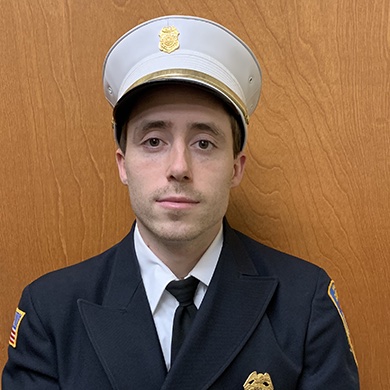
Bill Arneth
Captain
Co-founder & Head of Engineering
Fire Instructor I and Top Responder four years running. 33 years building software, with 8 US patents for live-data dashboards.
Mike Dempsey
Assistant Chief / Past Chief
Co-founder & Head of Operations
19 years in the fire service. Fire Officer I, Fire Service Instructor, and a high school math teacher for more than ten years.
Elizabeth MacDonald
Firefighter / Elected Fire District Commissioner
Co-founder & Head of Product and Design
Second-generation firefighter. 26 years in IT, an MS in Computer Science, and 5 patents for live-data dashboards.
FireOps1 is built by Signal 30, LLC — an official NERIS integration partner listed by FSRI, and NERIS V1 Data Exchange Compatible. Federal reporting is built to the standard, not bolted on afterward. See the official NERIS partner list
What members see on their phone
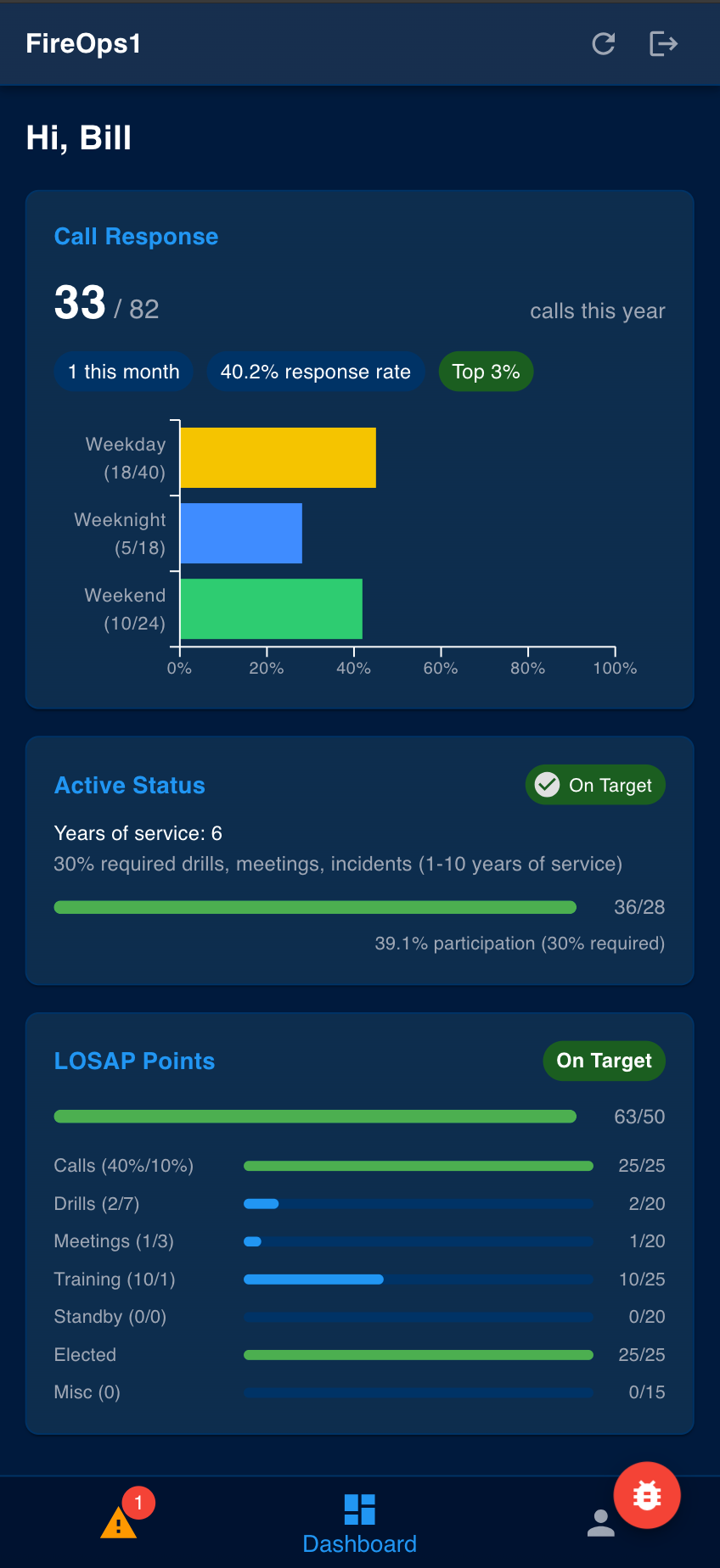
Member Status
Show member active status
Show LOSAP service hours
Incentivize attendance
Mobile Response
Check the response board from your device
View important call information
See apparatus en-route (with CAD integration)
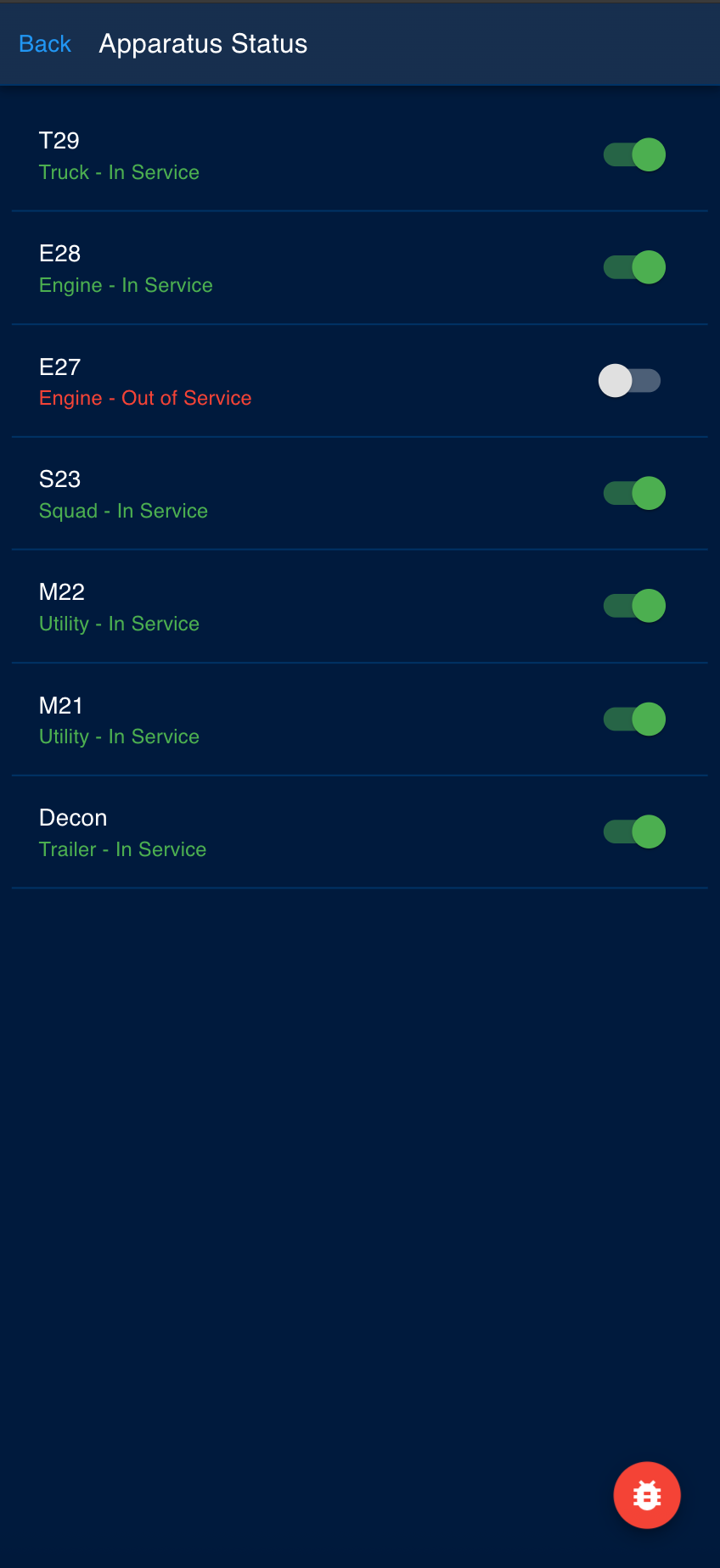
Apparatus Status
See real-time apparatus availability
View the most up to date run orders
Monitor fleet readiness
Try it for free!
Free
Blackhat — Free
Run order and limited history. Get your department set up in minutes — no commitment, no card required.
Capture call data like location, call type, notes and mutual aid automatically when a call starts to save time dispatching the right apparatus and when submitting NERIS! Email us at info@FireOps1.com to get started.
Frequently Asked Questions
Does FireOps1 replace our dispatch or alerting system?
No. FireOps1 supplements — and never replaces — your primary dispatch, paging, radio, and station alerting. Your members get toned out exactly the way they do now; FireOps1 picks up from there with response, apparatus, run order, attendance, and reporting.
Do we need a CAD integration to use FireOps1?
No. Any department can open a call in FireOps1 in a couple of taps, and everything downstream works the same. If your CAD can send an email or call an API endpoint on dispatch, the Dispatcher module ($33/month or $222/year) opens the call automatically with location, call type, notes, and mutual aid. We also offer a notification option that runs off your department's own radio frequencies. Email info@FireOps1.com and we'll sort out which fits.
Is FireOps1 NERIS compliant?
Yes. FireOps1 is built around the new NERIS federal incident reporting standard and is NERIS V1 Data Exchange Compatible. Captain and Chief tiers include full NERIS submission. See our NERIS reporting software page for details.
Can we import existing incident history and member data?
Yes. We can import historical incidents and member rosters from common formats (CSV, NFIRS exports). Reach out via the contact form below and we'll walk through your data with you.
What happens to our data if we cancel?
Your department's data is yours. On cancellation we provide a full export and retain nothing beyond what's required by law.
Is there onboarding and training for our members?
Yes. Every paid plan includes setup assistance and training sessions for officers and members. The free Blackhat tier includes self-serve onboarding documentation.
How is incident and member data secured?
All data is encrypted in transit and at rest. Access is role-based and scoped per department. We don't share data across agencies.
What's included in the free tier vs. paid plans?
The free Blackhat tier includes run order management, incident reporting, and 31 days of history with 5 admin and 1 kiosk account. Paid tiers add full history, NERIS submission, LOSAP tracking, kiosk check-in, and member management — see the full pricing breakdown.